
Seed3D 2.0 and Meshy v6 Raised the AI 3D Bar. Photogrammetry Still Wins These Three Jobs.
ByteDance shipped Seed3D 2.0 on April 23, 2026 — a next-generation 3D model that goes from a single image to PBR-textured geometry, claiming state-of-the-art on both shape and material. Meshy v6, out since January, added a Low Poly mode, an automatic multi-color 3MF exporter for FDM printing, and an API Playground for developers. The AI side of 3D had its strongest year yet.
So it's a good time to ask the practical question: what can these tools actually replace in your workflow, and what can't they?
The short answer is the same as it was twelve months ago, with a wider margin in some places and a much narrower margin in others. AI 3D is genuinely useful now for visual work. Photogrammetry still owns three jobs that haven't moved — and probably won't.
What Seed3D 2.0 and Meshy v6 Actually Do Well
Both products solve the same input problem in different ways. You give them an image (Seed3D) or an image plus a few hints (Meshy). They give you back a textured mesh in seconds.
Seed3D 2.0 introduced a two-stage coarse-to-fine DiT architecture that decouples overall structure from geometric detail. The practical result is sharper edges, better thin-walled structures, and a unified PBR generation path that produces physically plausible roughness, metallic, and normal maps from a single photo. The API is live on Volcano Engine.
Meshy v6 focused on the maker side. The new Multi-Color Print API converts an image into a slicer-friendly 3MF with 1 to 16 color palettes and configurable precision — the file lands in your slicer ready to print on a Bambu Lab or similar multi-material FDM. Low Poly mode produces clean wireframes for game engines without manual retopology.
These are real capabilities. Both products are now demonstrably better than what was available in late 2025, and both have moved past "novelty demo" into "production tool for the right job."
Where AI 3D Is Now the Right Tool
Three workflows have flipped clearly in AI's favor over the last year:
- Single-photo visual stand-ins. Concept art, mood boards, AR previews, game prototype set dressing. If the mesh needs to look right, not measure right, generate it and move on.
- Style-driven assets from text prompts. Stylized characters, props, low-poly game pieces. Photogrammetry can't make a model of something that doesn't exist; AI can.
- Quick one-click multi-color prints from a flat image. Meshy's new MakerWorld integration turns a 2D illustration into a printable 3MF. For decorative prints and fan content, this is faster than any photogrammetry pipeline.
If your project lives in one of those three buckets, the right answer is probably an AI 3D generator, not a camera. Use the better tool.
Where They Still Fall Short — In Their Own Numbers
The honest part of the AI 3D conversation is that the people building these tools acknowledge the boundary clearly.
Independent benchmarks put single-image AI 3D accuracy at 70–85% today: closer to 85% for common shapes the model has seen many times (chairs, sofas, simple props), closer to 70% for unusual or complex objects. That number describes how well the predicted mesh matches the real object — and the gap is not random. It concentrates on the back, the parts the photo never showed.
Reviews of the current generation flag the same failure modes:
- Transparency, reflection, and shiny surfaces still confuse the models. Glass, polished metal, and water are the classic problem cases.
- Complex scenes with multiple objects get fused into a single mesh. You lose the per-object segmentation that makes downstream editing possible.
- Roughly 1 in 10 generations is client-ready without rework, according to professionals using these tools daily for asset production. The other nine need touch-up in Blender, ZBrush, or a retopology pass.
- Hidden surfaces are invented from training priors, not observed. The model writes a plausible back; the real back may look nothing like that.
None of this disqualifies the tools. It just defines what they're for.
Where Photogrammetry Still Wins
Photogrammetry doesn't generate. It reconstructs. You walk around the object, take 40 to 200 overlapping photos, and the software triangulates the actual surface from what the cameras saw. There is no learned prior filling in the side that wasn't photographed. Every point on the mesh corresponds to a point on the real object.
That distinction matters in three places, and AI 3D doesn't close any of these gaps in 2026.
1. Anything you'll measure or manufacture
Close-range photogrammetry achieves sub-millimeter precision on small objects under good capture conditions, with real-world scale set from a known reference. AI 3D outputs in arbitrary units with 70–85% shape accuracy. Those are not interchangeable.
If a downstream step involves a clearance check, a fit, a replacement part that has to mate with something, or a CNC tool path, you need geometry that came from physical measurement. Replica's Scale by Camera Distance workflow operation locks absolute scale from reference distances you measured during the capture. The result is a mesh you can dimension.
2. Real objects you actually own
If you photograph a broken handle and want to 3D-print a replacement, the new part has to fit the original. Seed3D 2.0 can produce a handle-shaped object. Photogrammetry produces a model of that specific handle — the worn edge, the manufacturing asymmetry, the chip in the corner that determines whether the new piece sits right.
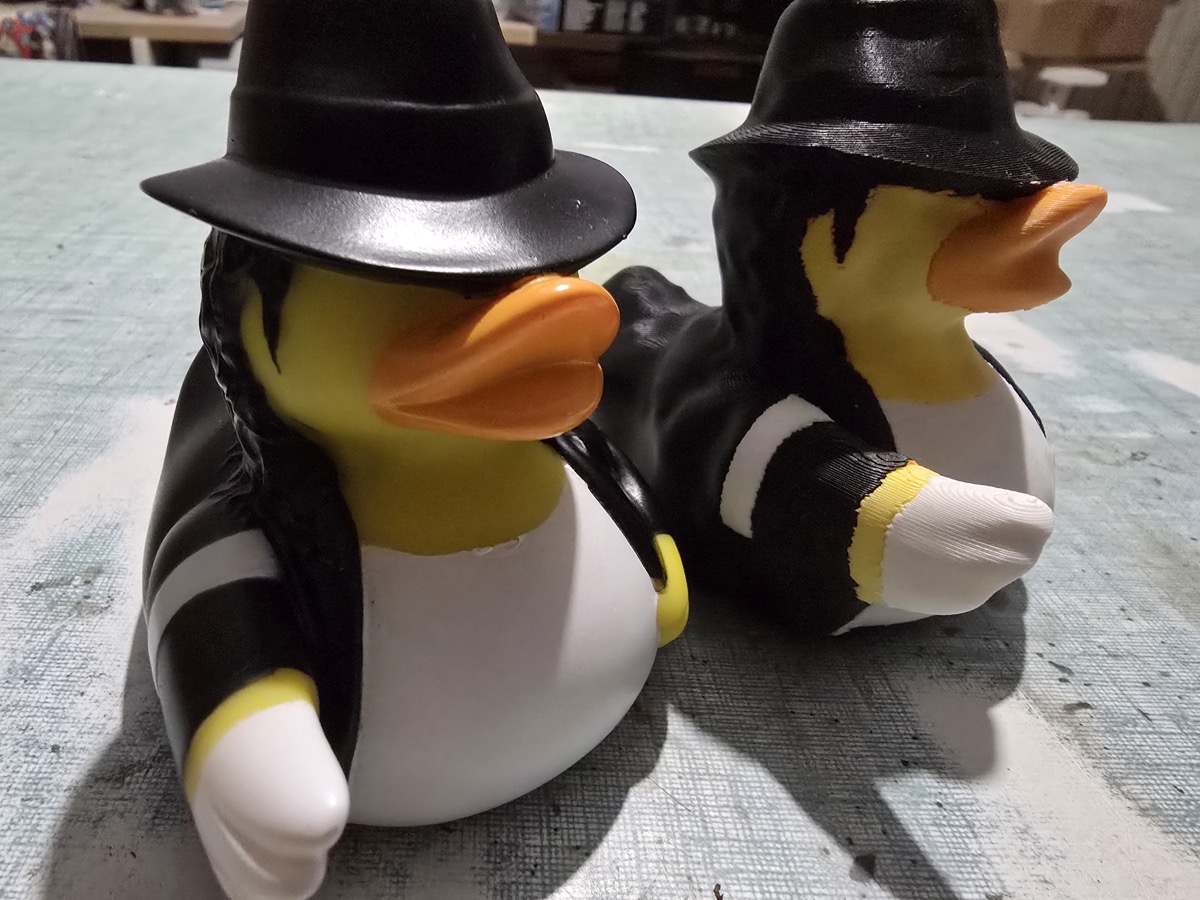 Photogrammetry captures the object as it actually is, including the asymmetries that make a replica fit the original.
This is the cleanest dividing line for makers. If the print is decorative, an AI model is fine. If the print has to mate with a real-world counterpart, you need a real-world capture.
3. Cultural heritage and documentation
For artifacts, archaeological sites, museum collections, and product archives, the value is in capturing what is actually there — the wear, the irregularities, the patina, the manufacturing details. Generative models smooth these away by design: they regress toward the mean of their training data. A photogrammetric scan of a Roman tomb is documentation. A Seed3D output of the same tomb is an interpretation.
A Decision Framework
| AI 3D (Seed3D 2.0 / Meshy v6) | Photogrammetry (Replica) | |
|---|---|---|
| Input | 1 image (or a prompt) | 40–200 overlapping photos |
| Time | Seconds | Minutes to a few hours on a Mac |
| Geometry source | Learned priors + visible cues | Triangulated from real photos |
| Hidden surfaces | Generated from training | Captured if photographed |
| Real-world scale | Approximate | Sub-millimeter with reference |
| Best for | Visual, prototype, stylized, single-image | Measurement, manufacturing, archive, replication |
| Failure mode | Smooth, plausible, wrong | Holes where coverage was missing |
The two technologies aren't competing. They're solving different problems on either side of a clear line: plausible and fast versus real and measurable. The right question is which one your downstream use needs.
A Hybrid Workflow That Actually Works
The interesting pattern emerging in 2026 isn't "AI replaces photogrammetry" — it's teams using both, deliberately, for different stages.
- Concept pass: Generate quick AI 3D mockups to align with a client on direction. No camera, no capture session, no rework cost if the direction changes.
- Production pass: Once direction is locked, capture the real object with photogrammetry. The mesh ships into the same downstream pipeline (Blender, Unreal, Unity, slicer).
- Variant pass: Use AI tools for stylized variants, retopology assist, or texture generation on top of the real captured geometry.
Replica fits the production pass. It runs natively on your Mac — no cloud upload, no per-token billing, no queue. Point it at a folder of photos, get back USDZ, OBJ, FBX, GLB, or a print-ready watertight mesh. Replica Link lets you shoot from a phone in the field and trigger reconstruction on the Mac in the studio without moving files.
For the price of a single annual seat in some AI 3D services, you own the photogrammetry pipeline outright on the hardware you already have.
What This Year Actually Changed
A year ago you could say "AI 3D is a toy" and most professionals would nod. That sentence is no longer true. Seed3D 2.0 produces materials that hold up in production rendering. Meshy v6 prints multi-color objects in one click. The bar moved.
What didn't move is the line between generated and captured. AI tools generate plausible geometry from priors. Cameras capture the real thing. The first is enough for an enormous and growing share of 3D work. The second is necessary for the rest of it, and the rest of it includes the highest-value jobs: real objects, real measurements, real archives.
If your work falls on the captured side of the line, the question isn't whether to use AI 3D — it's how to integrate it into a pipeline that still has a camera at the front.
Try a Real Capture
Download Replica for macOS and run a side-by-side test on something you can hold: generate it with Seed3D 2.0 or Meshy, then capture it with Replica. The first time you compare the two meshes of the same object, you'll see exactly where the line sits for your work.
Free datasets to start with:
- Easter Bunnies — hand-painted objects, iPhone captures, print-ready STL included.
- Appian Tomb — 116 photos of a Roman tomb on the Via Appia, full reconstruction project.
Questions or feedback? Email info@ambiensvr.com.